Notes: Scratch, The Programming Language
Some disorganized notes on Scratch.
Scratch is a concurrent, event-based, actor-oriented programming language and multimedia tool design as means of teaching programming to children. TurboWarp provides a mechanism of compiling Scratch scripts to JavaScript for faster preformance and self-hostable distribution. TurboWarp also add some QoL features to the editor (such as onion skinning).
Scratch has the notable feature that all scripts and script fragments can be activated by clicking them. This allows for a live-programming experience. However, it can also lead to unique edgecases when interacting with Scratch's concurrency (see Event Cancellation).
This article will be making use of a textual psuedocode as I don't feel like screenshotting scratch blocks all the time. Especially since I'll more or less be writing the same thing for alt-text.
Also, this article will not be talking about Scratch's editor, it's effectiveness as a teaching tool, nor judging if it's a good or bad first language. My goal here is an attempt to loosely document scratch as a programming language. I want to probe some of the semantics of the language. Thus, it will be ignoring things releated to its game engine and use as an education tool.
Plenty of people have opined at length about Scratch, and it's merits or lack there of. There is little of interest in those discussions to me. Most of them are simply substituting one set of weakly substantiated claims for another set of personally held absolutely unsubstantiated claims.
Usually the author's personal experience.
Scripts and Blocks
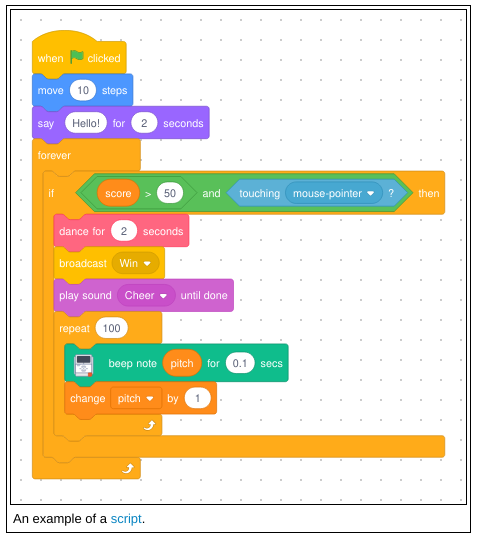
Blocks are the basic unit of a scratch program. They are assembled togheter into Scripts. Every stack of blocks is considered a script in scratch. Stacks which are not connected to a Hat Block are called "script fragments". Scripts are all evaluated concurrently. While loops each yield to other scripts, allowing a frame to pass before starting their next cycle. Custom blocks can turn this off however, enabling themselves to be evaluated atomically.
Custom blocks are basically Scratch's version of function definitions. However, they are localized per-sprite instead of across the whole project. You can however utilize the backpack to carry ready-made assets (actors, stages, scripts, etc.) between projects.
Block Shapes
- Hat Block
- A block which starts a script. These can only connect to the start of a stack. Without a Hat Block, a script is only a fragement disconnected from the runtime.
- Stack Blocks
- Blocks which connect together sequentually allowing for other blocks to be inserted befor and after them.
- C Block
- These are blocks which wrap around a stack. They usually encode control-flow. C blocks can be either a Stack Block or a Cap Block. An of a C Cap Block example is the
Foreverblock. WhileIf <>is a C Stack Block. - Cap Block
- The oppisite of the Hat Block. These terminate a script and disallow new connections to be added.
- Reporter Blocks
- These are blocks which report a non-boolean value. They cannot connect to Hat, Stack, C and Cap Blocks. They are intended to be embedded into slots those blocks may have.
- Boolean Block
- These are blocks which only report boolean values. Like Reporter Blocks, they are intended to be inserted into specific slots.
Events
Scratch has two types of event producing blocks Broadcast () and Broadcast () and Wait. The Broadcast () block queues events for execution without pausing the currently active script. Whereas Broadcast () and Wait will pause the script that executes it. Events cannot have data associated with them. The only way to pass data to an event is to set one or more global variables before emitting.
This same mechanism can be used to return data from an event
A demonstration of broacasting an event which request the position of one of the dots on screen. If the target dot exist, new variables are set. Those variables are then used to jump the cursor to a specific location. This happens on every full cycle of the animated clock shown in the top right.
This can enable a somewhat fault-tolerate system (as shown above). When IDs are missing, the system simple continues onwards. There is nobody to reply back to the green arrow, so it simply stays in place.
Event Cancellation
Only one instance of a script can be active for an event. If a script recieves an event while still evaluating, then it will be cancelled, then restarted. This cancellation can happen whenever a script yields to the event loop. Blocks that can be interrupted are Repeat (), Forever, Wait Until <>, Repeat until <>, While <>, Broadcast () and Wait and Wait () Seconds. This cancellation triggers all scripts executing Broadcast () and Wait to consider the terminated recipient as "finished".
-- Script A
When I Receive (message1) do
  Broadcast (message2) and Wait
  Change (x) by (1)
end

-- Script B
When I Receive (message2) do
  Broadcast (message3) and Wait
  Forever do
  end
end

-- Script C
When I Receive (message3) do
  Broadcast (message2)
end
When Script A is started, it will broadcast the event "message2", triggering Script B. Script B then triggers Script C by broadcasting the event "message3". Finally, Script C broadcast a second "message2" event. This triggers Script B to be cancelled, allows Script A to resume. Without Script C, Script A would wait on Script B indefinitely.
This has the edgecase of allowing scripts to race against themselves. This race condition only appears when executing the script by clicking it. If the script is trigged via a broadcast block, the race condition does not happen. (As far as I can tell)
When I Receive (message1) do
    Change (x) by (1)
    Broadcast (message1) and Wait
    Change (y) by (1)
end
When this script is triggered via clicking, both x and y will start to increment rapidly. However, after some time, only x will keep counting upwards. y will stop at a random number.
It's worth noting that the order of execution cannot be relied on. The order in which scripts execute should be treated as non-deterministic. I'm uncertain if the above interaction could happen via normal execution, but relying on possibly order-depedent behavior is a logic error in Scratch.
Is there anything more beautiful than teaching children the pain of concurrent programming?
State
Scratch has two types of variables: global and local. Local variables are encaspulated to each instance of an actor. Global variables are shared across the whole proogram. Scratch has no block-local variables. If a value needs to be shared by two actors, it must be passed through the global name space.
Scratch has no means of storing references to other actors. An actor cannot be stored in a list nor a variable. This is why data must be handed to the global space. Actors have no means to communicate aside from broadcasting events to all listeners.
The only data structure Scratch provides is the list. List in scratch can only store simple data like strings and numbers. Like actors, lists cannot be referenced by variables. Nor can they be shared between actors unless they are a global list.
Setting a variable to the value of a list concatenates the values together as a string. If all items in the list are of length one, then they are joined together without spaces. However, if any string is longer than a single character, then the list is joined together with spaces.
After poking around, it seems like any character after U+10000 (𐀀 Linear B Syllable B008 A) will trigger the string to suddenly have spaces. I feel like it would have been better to have a block like
Join (list) using (seperator)rather than trying to automagic this.
An Observation About Memory Usage
The above has interesting implications for memory usage in Scratch. While the runtime is written in JavaScript, a native runtime could do away with most heavy-weight garbage collection. There is no means of forming trees, graphs, and cycles. And the only entity that can hold referneces to actors is the runtime itself. Actors are completely isolated from each other, so it should be safe to deallocate all data it holds internally.
Reactive Programming?
Scratch features a block called Wait Until <>. This block suspends a script until a boolean condition is satified. The condition is continously checked for changes until it returns true, allowing the script to resume. This means you can turn any variable into a observable value. It's not really a reactive programming, but you could pair this with other features to chain together state changes.
I only noticed this while writing the article. I was kinda surprised to see it. Unfortunately, like cancellation, it behaves weirdly when triggered by clicking.
Upon closer inspection, this block is identical to an empty
Repeat until <>. Which itself is the same asWhile <Not <>>.
The Rest of The Cat
Outside of the above, Scratch follows the general semantics of a procedural language. Instructions are ran in sequence, variables are assigned without any additional effects. There is not much to note in that regard.
Most of what makes the experience of Scratch unique is its editor. It's an inherently a multimedia space. When working with a drawing tablet, it can enable a rather tight flow state. It's an unfortunately rare experience.
A Brief Note About the Backpack
The backpack is a rather interesting utility. It's Scratch's way of letting you transport assets between projects. It essentially allows the user to build up a personal repository of ready-made assets. It works for all assets in a project. You can collect code snippets, actors, sounds, backgrounds, etc. It's a rather powerful utility that I have never seen in any other tool.
It makes reusing everything from whole assets to script fragements extremely simple. It's rather basic, however. I think one improvement I'd make would be per-project backpacks alongside the global backpack. Another improvement would be filtering and searching.